In this article
- What happens inside the chatbot, step by step
- The five steps, from message to answer
- 1. Give the agent your content
- 2. Check what it actually learned
- 3. Set the tone and the handover rules
- 4. Put the agent on your website
- 5. Read what it answered
- What happens the first time a visitor asks a question?
- What should you test in the first hour?
- Where AI chatbots still get it wrong
- What you get once it is live
How do AI chatbots work?
An AI chatbot works in five steps. It reads the visitor's message, uses natural language processing to work out the intent behind it, searches a knowledge base built from your own content, writes a reply in plain language, then logs the exchange so you can see what was asked. The whole loop runs in about a second, and it runs at three in the morning as readily as at midday.
That is the mechanism. The part most explanations leave out is that you can watch it happen on your own material in under a minute. Point a Dante AI agent at your website, then ask it something only your site can answer. Every step below stops being a diagram and becomes something you can see.
Try it yourself. Train an AI agent on your website, docs, or files. Live in 60 seconds. No code needed.
What happens inside the chatbot, step by step
The five steps above are what the software does between a visitor pressing enter and an answer appearing. They run every time, in roughly a second, and none of them require you to do anything once the agent is live.
1. It reads the message as text, not as a command
A rule-based chatbot matches your words against a list of trigger phrases it was given in advance. If you do not use one of those phrases, it fails. An AI chatbot has no trigger list. It converts your sentence into a numerical representation of its meaning, which is why "are you open on Sunday", "do you work weekends" and "can I come by tomorrow, it is Sunday" all land in the same place.
2. It works out what you are actually asking for
This is the intent step. The model separates the subject of the question from the thing being asked about it. "How much is the annual plan" and "what does it cost per year" carry the same intent expressed two ways. Getting this step right is why an AI agent handles a question it has never seen before, and a rule-based bot does not.
3. It searches your content for the passage that answers it
This is the step that decides whether the answer is any good, and it is the step most explanations skip. The agent does not answer from general knowledge. It searches the material you gave it, your website, your documents, your policies, and retrieves the passages closest in meaning to the question. If the answer is not in your content, a well-built agent says so rather than guessing.
4. It writes the reply in plain language
The retrieved passages and the original question go to a language model, which writes a direct answer rather than pasting a paragraph of your terms and conditions. The constraint that matters here is grounding: the reply is built from what was retrieved in step three, so it reflects your business rather than the internet's average opinion of your industry.
5. It records what was asked and what it said
Every exchange is logged. That log is the most useful thing the whole system produces, because it is a list of what your customers actually want to know, in their own words, at the moment they were deciding. Most owners have never seen that list.
Those five steps are the mechanism. The five numbered sections that follow are the practical side: what you do once, to make the mechanism run on your own material.
The five steps, from message to answer
- It reads the message. Whatever the visitor typed, spelling mistakes and all, is turned into a representation of meaning rather than a string of characters. This is why “do you ship to Ireland” and “can I get this delivered to Dublin” land in the same place.
- It works out the intent. Natural language processing separates what the person wants from how they happened to phrase it. A rule-based system matches keywords and falls over on anything unscripted. An AI agent matches meaning, so it copes with the phrasing nobody anticipated. Our rule-based vs AI chatbot guide covers when each is the right call.
- It searches your knowledge base. The agent looks through the content you gave it, your pages, your PDFs, your policy documents, and retrieves the few passages closest in meaning to the question. This retrieval step decides whether the answer is right. A model with no grounding invents. A model holding your documents quotes them.
- It writes the reply. A language model turns the retrieved passages into a sentence a person would actually say, in the tone you set, in the language the visitor used.
- It records what happened. Every question, answer and dead end goes into a log. Those logs are the most useful thing the agent produces, because they tell you what customers ask that your website does not answer.
Steps one, two, four and five are much the same wherever you build. Step three, retrieval, is the only one you control, and it is the one that decides whether the answers are any good. So the rest of this guide is step three, done on your own content. Here it is as the five things you actually do, and you can follow them on your own site while you read.
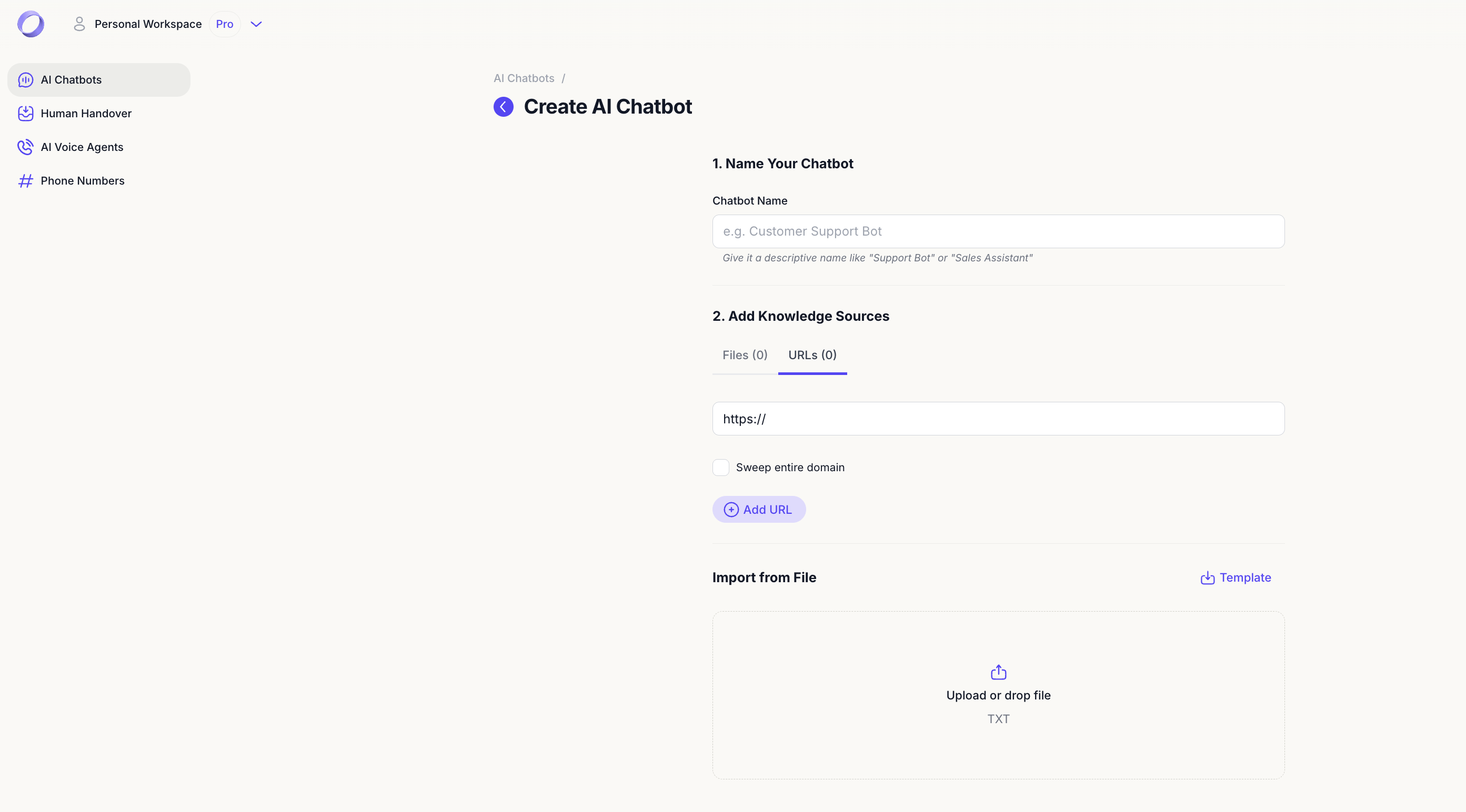
1. Give the agent your content
Start by creating your account and pasting in your website address. The crawler reads your pages, splits them into passages and indexes them by meaning.
Then add whatever the crawler cannot see: PDFs, product documentation, refund policies, the internal FAQ nobody has published. Anything a new member of staff would need on their first day is the right material. Anything out of date is worse than nothing, because the agent will quote it confidently. There is more on picking sources in our guide to training a chatbot on your own data.
2. Check what it actually learned
Before anyone else sees it, ask the agent the three questions your support inbox gets most. Then ask one thing your site genuinely does not cover.
A properly grounded agent says it does not know and offers to take a message. If it guesses instead, the fault is almost always step three: a missing page, not a broken model. Add the page, retrain, ask again.
3. Set the tone and the handover rules
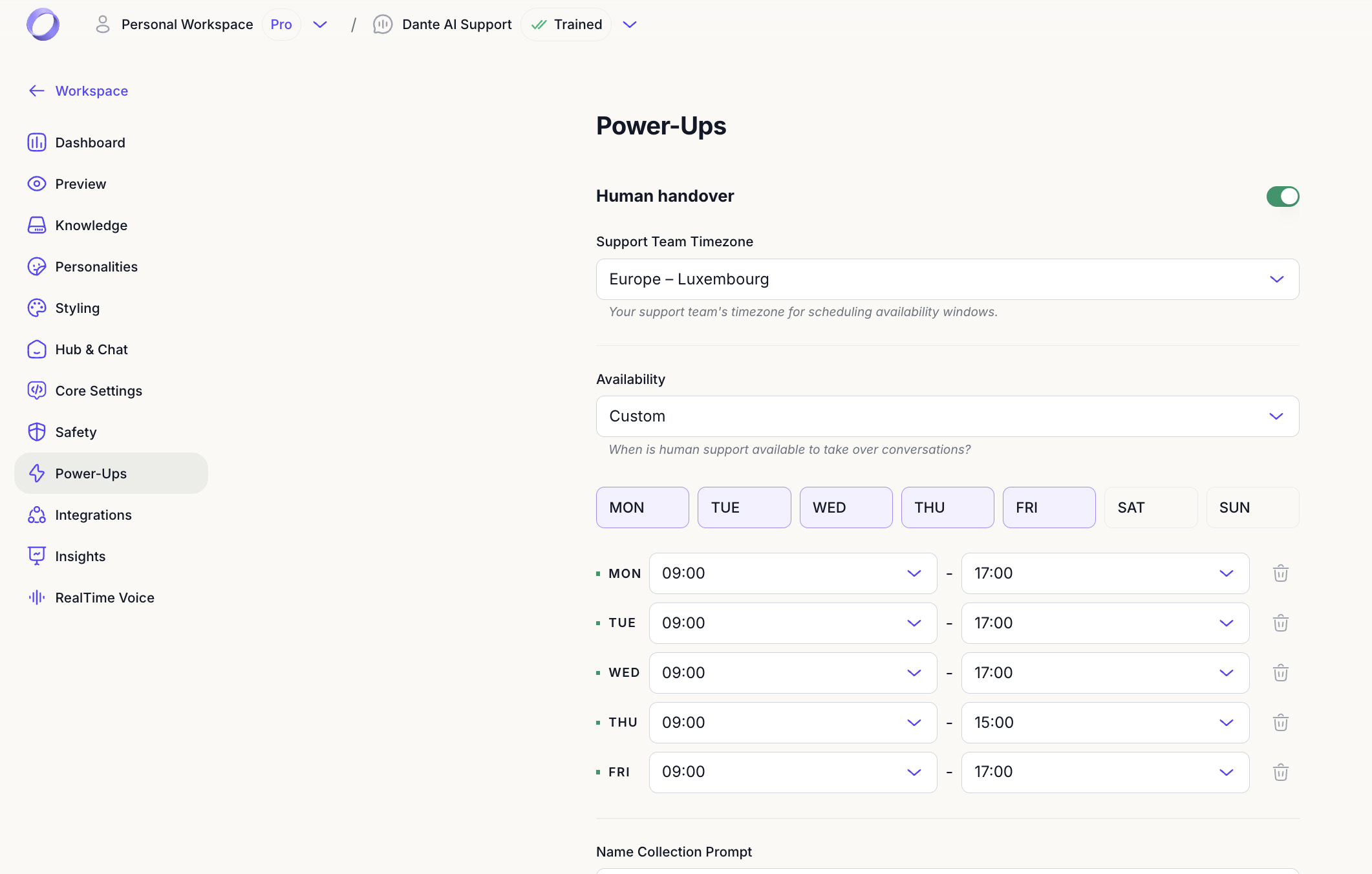
The same knowledge base can sound like a solicitor or like a shop assistant. Set the tone, the greeting and the fallback line so it reads like your business.
Then decide where a person takes over. Human handover can trigger when a visitor asks for it, when the agent fails twice, or inside set hours. You can add a scheduling button so a qualified question becomes a booking rather than a transcript, and lead capture runs in the same conversation, so an email address arrives with the question already attached.
4. Put the agent on your website
Copy the embed snippet and paste it into your site builder, CMS or theme, in the same place you would put an analytics tag. One script tag is the whole integration.
From account creation to a live agent on the page takes under 60 seconds if your content is already online. If you want the widget in the corner of every page rather than on one, see how to add AI chat to your website.
5. Read what it answered
Open the conversation logs the next morning. You are reading for two things: questions answered wrongly, which means a content gap, and questions asked often, which means a page you should write.
Feed both back into step one. Run that loop weekly and it is the difference between an agent that is impressive in week one and one that is still useful in month six.
What happens the first time a visitor asks a question?
All five steps fire in roughly a second, against your content rather than a generic index. What the visitor sees is a reply quoting your own returns window rather than a generic one, at eleven at night, without waiting for the next working day. A well trained agent answers most customer questions on its own, and the rest reach a person with the context already attached.
What should you test in the first hour?
- The three questions your support inbox gets most
- One question your site does not answer, to confirm the agent declines instead of inventing
- A question typed badly, with typos and no punctuation
- A question in a second language, if you get that traffic
- The handover path end to end, including where the message lands
Where AI chatbots still get it wrong
When we look at logs from new accounts, the failures are almost never the model. They are content.
The three we see most: a pricing page updated on the website but never re-crawled, a PDF exported as scanned images so nothing could be read out of it, and forty documents uploaded when six would have done. Retrieval gets worse as you add material that is only nearly relevant. Fewer, cleaner sources beat more.
What you get once it is live
- Visitors get answers at the moment they are deciding, not the next working day
- Repeat questions stop reaching your inbox
- Every conversation tells you something your website fails to explain
- Leads arrive with the question already attached
The last bit of understanding comes from running the loop once on your own material. Point an agent at your website, then ask it the three questions your inbox gets most and one thing your site does not cover. What comes back tells you more about the mechanism than any diagram, and it takes about a minute. Build and test on the free plan, which includes 100 message credits per month, then move to a paid plan from $40 per month when the volume justifies it.
Further reading
Keep going with these guides from the Dante AI library: